Standup - Desk Remote Control
Your sit/stand desk, one click away in the menu bar — and it stands up before your meetings.
Everything a desk remote should do
Simple by default. The automation is there when you want it and quiet when you don't.
Menu bar popover
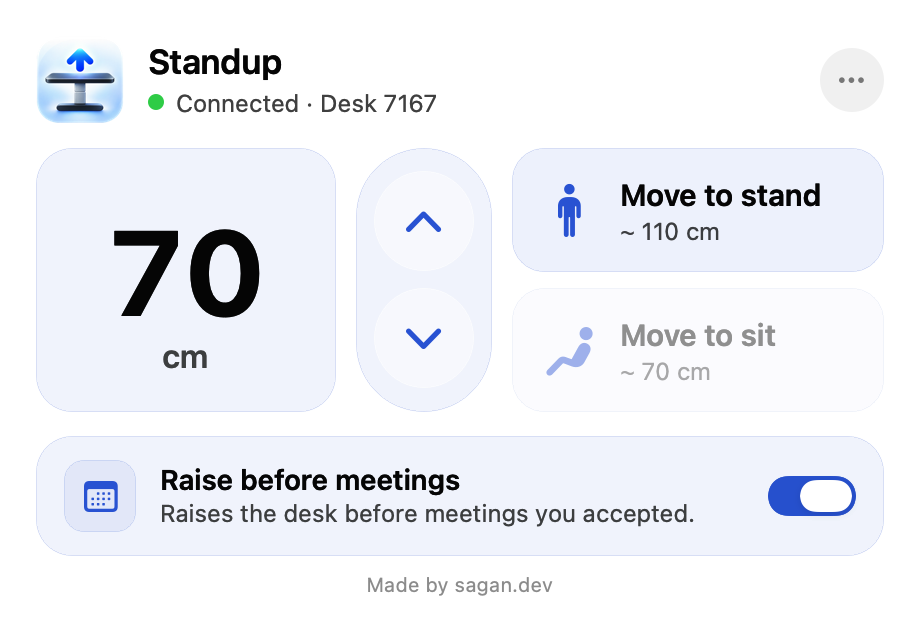
Height, connection status and desk name at a glance. It lives in the menu bar — no Dock icon, no extra windows.
Hold to move
Hold the round raise or lower button and the desk keeps moving; let go and it stops. It never runs away.
Stand and Sit presets
One click sends the desk to your saved standing or sitting height and stops there. Click again to stop on the way.
Stands up before meetings
Standup reads your Apple Calendar — including Outlook, Exchange and Microsoft 365 accounts added to macOS — and raises the desk shortly before an online meeting you accepted. It goes back down when the meeting ends.
Heads-up nudge
Before the desk moves on its own it gives two tiny nudges in the direction it is about to travel, then waits a second — it never starts without a warning.
Knows when a call runs over
Optionally keeps the desk up while Zoom, Teams, Webex, Slack, FaceTime or your browser is still using the microphone or speaker. It only sees that audio is in use — never the audio itself.
Unplanned calls
When a call starts that is not in your calendar, a notification offers to raise the desk. Nothing moves until you click.
Meeting ended early?
When the call goes quiet before the scheduled end, a notification offers to lower the desk — right away after half-time, or after two quiet minutes earlier in the meeting.
Webhooks for your smart home
Tell Home Assistant or any other service when a meeting starts and ends, so the desk lamp, a "do not disturb" light or the blinds follow along. How it will work →
Hourly stand goal
Set how many minutes per hour you want to stand. Time you already stood — in meetings or by hand — counts, so the desk only rises for what is missing.
AppleScript and Shortcuts
Scriptable with simple commands, so you can move the desk from Shortcuts, Alfred or your own scripts.
Requirements
- macOS 13 or newer
- A Bluetooth sit/stand desk with a Linak controller, such as the IKEA IDÅSEN
- Bluetooth access (to talk to the desk); Calendar access only if you use the meeting features
Standup is not affiliated with IKEA or Linak.
Open source
A free open-source edition with the same look and manual control — without the meeting automation — is on GitHub.